During the summer of 2025 I created the first draft of my Entity Component System hoping that I would be able to use it in the upcoming game projects at The Game Assembly. I was lucky enough to get a group that was positive towards implementing it in our game engine created by the school and use it to manage game objects in our custom game engine and since then I have iterated on the system to fit the needs of our group as well as improve the performance of the system.
What is an ECS?
An Entity Component System (also known as ECS) is a system for storing and accessing data connected to an entity. All objects in a game have to store different kinds of data, like what model to use, the health of an enemy or player, sound effect to play, position and much much more. The problem is how do we store different sets of data for every object while making it easy to access and iterate on and still have good performance. This problem is something me and my previous group members at The Game Assembly have faced and we have used many different solutions, but they always had problems. Some were hard to scale, others poor performance, so I set out to create a system that was both flexible and performant so that we could use it for the next 3 upcoming game projects. This is what I aimed to solve by creating an ECS and also defined the goals I had with the project.
Archetypes
So how do you store all of these components? One solution is to store all components of the same type in an array and use lookup tables to find a specific component that belongs to an entity. With this approach it becomes easy to loop through all components of a specific type, but if you want to loop through multiple components at the same time, you would have to do a lookup for every component.
This is where archetypes come into play, instead of storing all components of one type in one big array, we create one archetype per unique set of components and create one array for each component in the archetype and store the components in these arrays instead. This way, if we want to loop through a set of components, we only have to find all archetypes that contain this set of components and then loop through all components inside them. Any set of components in the same archetype on the same index, all belongs to the same entity. This makes it easy to get all components that belong to a specific entity.
Ease of Use For Developers
One of my main goals with this system is to make it easy to use for developers. This means that creating entities, making new types of components and adding/removing them to entities as well as accessing them all have to be easy. It should require little code and be easy to understand.
Defining a component is just creating a struct with some members, the rest is handled internally. To create entities you call a function which takes in information about the entity, like its name, then you can store the return value for later use. Then to add a component to an entity, you call the AddComponent function on an entity, all arguments sent into the function get forwarded to the constructor of the component.
  struct PlayerComponent
  {
    float speed;
    float health;
    bool isAlive;
  };

  void main()
  {
    ECS::Entity entity = ECS::CreateEntity("Player");
    entity.AddComponent<PlayerComponent>(25.f, 100.f, true);
  }
The return value from “CreateEntity” is not a pointer to the data and does not contain the data itself, the entity class only stores the ID used to refer to that entity. This means that the entity class can be stored between frames and used as a reference to that entity.
Now when entities are created and a component has been added, how do we access them? There are multiple ways to access entities and their components, the method that most of my group members and I ended up using the View helper class.
View is a class that finds all entities that have a set of components, this set is defined in the views template arguments. Creating a view with the template arguments “TransformComponent” and “PlayerComponent” would create a view that allows you to iterate through all entities that have those components. The view class can be iterated over either using its “ForEach” function which runs a callback for each entity, or use it in a foreach loop. These functions will allow you to access the entities themselves, and all components specified when creating the view.
  void Update()
  {
    ECS::View<TransformComponent, PlayerComponent> entityView;
    for (auto [entity, transform, player] : entityView)
    {
      transform.position.x += player.speed;


      std::cout << entity.GetName() << " moved!\n";
    }
  }
The types of the variables in the structured binding are inherited from the template arguments. This is to limit repetition of variable types and create an easier workflow for developers to create and change what a view iterates through.
It is also possible to find a specific entity from a set of components. There exist many entities that only have one instance, the player can be one such example. Creating a view only to find one entity was a bit too much so I created the FindEntity function that can be used to make this task easier to write and read.
  ECS::Entity player = ECS::FindEntity<PlayerComponent>();
  std::cout << player.GetName() << '\n';
Performance
This system was going to be used to handle all game objects in our game, this meant that performance was important.
Natvis
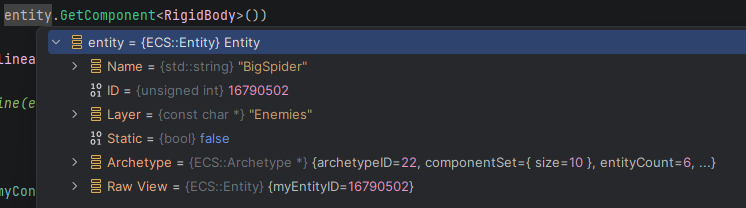
A debugger is a very powerful tool, but because the entity class only stores an ID, that is all you can see using the debugger. This quickly made it hard to find bugs when you wanted to know what a certain entity was. I wanted to find a way to fix this and after some research found out that it is possible to write a .nativs file that the debugger can read and create custom display logic for different types!
With this I made some data visible to the developer when previewing an entity.